Ad pre-production
Board a concept before anyone books a crew. Six frames with the same product and the same talent is what gets a spot approved — and reboarding after feedback costs a re-prompt instead of a re-shoot.
AI storyboard
Any length, any language. Writing the board is free.
One real board — the six keyframes and all four cast references are its own renders, names translated from the original Chinese session. The opening line is a reconstruction; that session's prompt wasn't recorded.
One story in
A real board, not a mock-up. Every frame below is its own render — what makes them a board rather than six pictures is that the lead, the prince and the street were locked before any of them were drawn.
 01
01Shanghai street, dawn
“Just another ordinary morning. Or is it?”
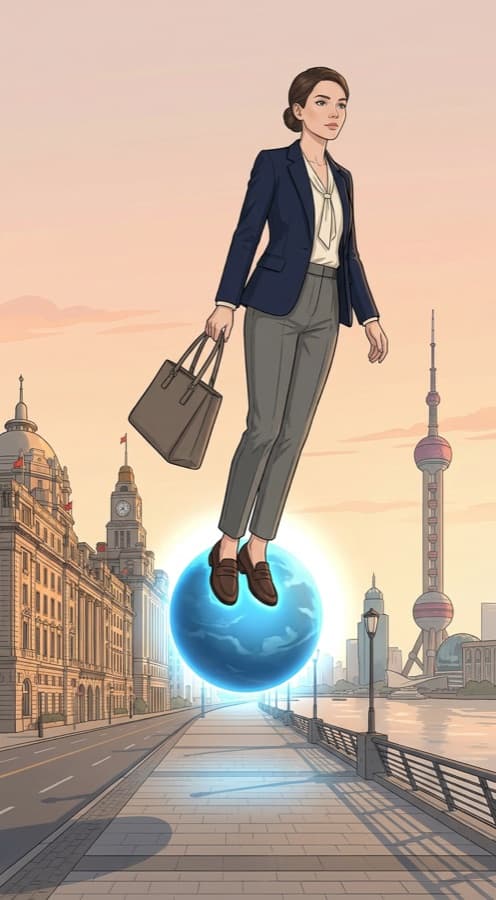 02
02Lifted off her feet
“Wait — wait, wait, WAIT—!”
 03
03Asteroid B-612
“Where… am I?”
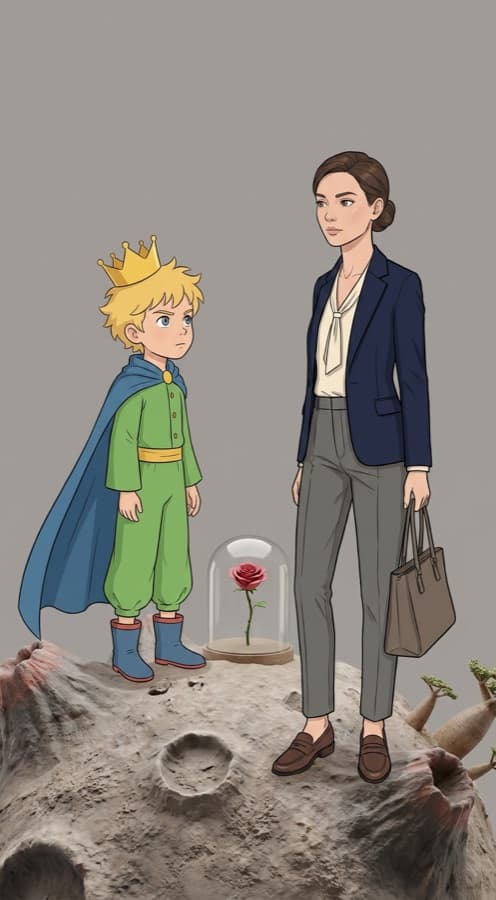 04
04The Little Prince
“Which planet are you from?”
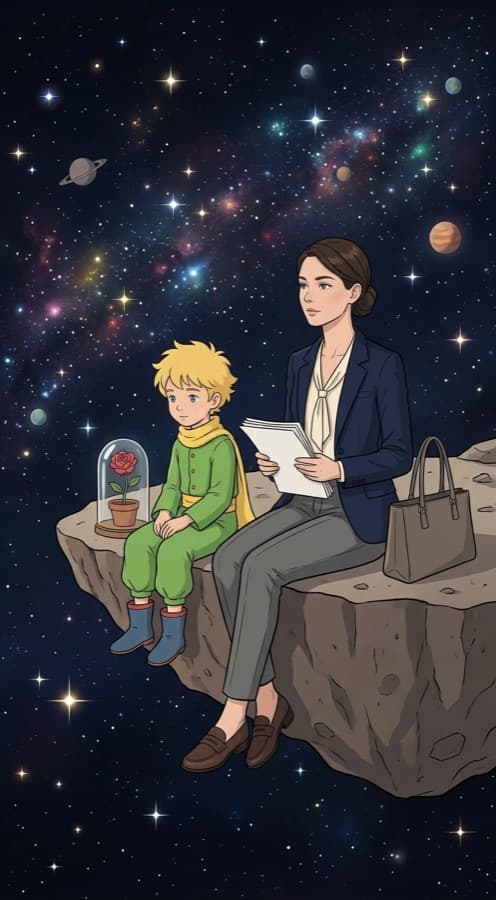 05
05Edge of the planet
“The universe is so vast — my worries feel so small.”
 06
06Back on the street
“To tame someone takes only a morning.”
Before anything renders
The writer reads your story and works out what recurs — not just who, but where. Each one gets a shared reference, and you lock them before a single keyframe is paid for. Two of the four below are places, and that is why the street in the last shot matches the street in the first.
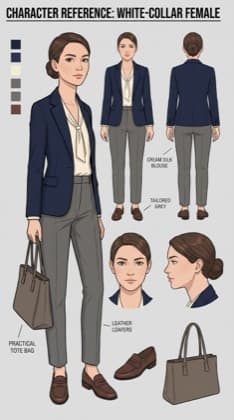
character
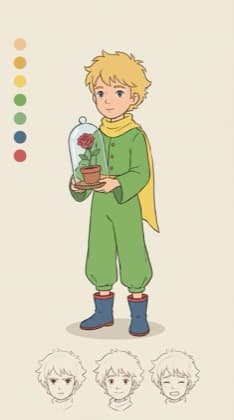
character
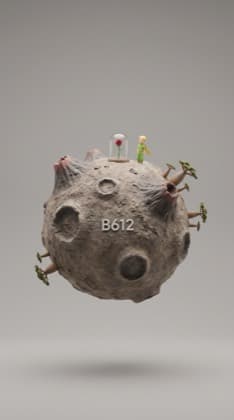
location
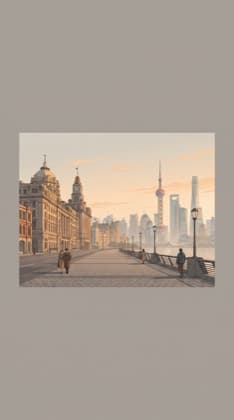
location
Locking is offered, not forced — the three real exits are lock and render, render without locking, or not yet.
How it works
A sentence, a logline, or a full script. No shot count to pick, no template to fill — the writer decides how many beats the story needs and writes them in order.
Before anything renders, you get the recurring subjects and settings the story implies, and a reference built for each. Lock them, render without locking, or come back later.
Shots land as text first — what is on screen, and the line for it. Keyframes then render against the locked cast, so the same faces and the same places recur frame to frame.
Narrate the board in a voice and play it back, share a link, or export a PDF for the people who still want a printed board in the room.
Two ways to play it
A board becomes video one of two ways, and the cheap one is the default on purpose.
Ken Burns motion over the keyframes with a voiceover reading each shot. The voice tells the story and the still carries the visual — about 20× cheaper than animating, and the dominant short-video format anyway.
Real image-to-video motion per shot, driven from the keyframe. The expensive option, and worth it for the shots that actually need movement rather than all of them.
Who boards
Board a concept before anyone books a crew. Six frames with the same product and the same talent is what gets a spot approved — and reboarding after feedback costs a re-prompt instead of a re-shoot.
Vertical serialised fiction lives or dies on whether episode four looks like episode one. Locking the cast up front is what makes a run of shots read as one show rather than six unrelated renders.
A picture book is a consistency problem with a plot attached. Lock the character and the world once, then let the story move through them page by page.
Script to narrated board is the whole pipeline for explainer and story channels. Narrate mode is built for exactly this shape: a voice carrying the story over stills that do not need to move.
No surprises
The story, the shots, the captions and the cast proposal cost nothing — that is the part competitors put behind a paywall. Signup includes 100 free credits for the keyframes.
Keyframes, narration and animation each show their credit cost before you spend. You can board a whole story, then decide shot by shot what is worth rendering.
The cast is proposed and approved before the keyframes render, not after. You are never paying to discover that shot four changed your lead’s face.
Animate mode uses video models, which unlock on Starter — $9 for your first month, then $29/mo (or $19/mo billed annually). Narrate runs on the cheaper text-to-speech path. No forced annual contract.
A storyboard is the cheap version of a film. Before anyone books a camera, you draw the shots in order so the people paying for it can see what they are buying. An AI storyboard generator does that drawing — you supply the story, it decides how the story breaks into shots, writes what is on screen and what is said, and renders a frame for each.
The hard part was never generating one good frame. It is that shot six has to contain the same person as shot one. Board six frames with an ordinary image generator and you get six strangers in six unrelated places, because nothing carries identity between prompts. That is the failure everyone in this category is actually competing on, and it is why the useful question to ask any of these tools is not “how fast” but “what holds”.
The approach here is to settle it before rendering rather than after. The writer emits the recurring subjects and settings in the same pass as the shots, a shared reference is built for each, and you approve that cast while it is still free to change. Every keyframe then renders against the approved set. Locking places matters as much as locking faces — a story that returns to the same street should return to the same street.
What you do with a finished board depends on the job. For approvals, a PDF or a share link is the deliverable and always has been. For anything that needs to move, most boards are better narrated than animated: a voice reading each shot over a still frame is both the dominant short-video format and roughly twenty times cheaper than generating motion for every shot. Spend the motion budget on the shots that earn it.
FAQ
Writing the board costs nothing — shots, captions and the cast proposal are free. 100 credits at signup for the frames.