AI Model Photoshoot
Drop in your garment, pick a scene, and Mintdreamer generates photorealistic fashion model shots that keep your product's colors, patterns, and fit exactly right. Built for Shopify stores and apparel brands.
Your photo and settings carry into Studio. Starter is required to run Apps; check the final cost before generating.
 Real output
Real outputs. Pick an example to pause.
What comes out
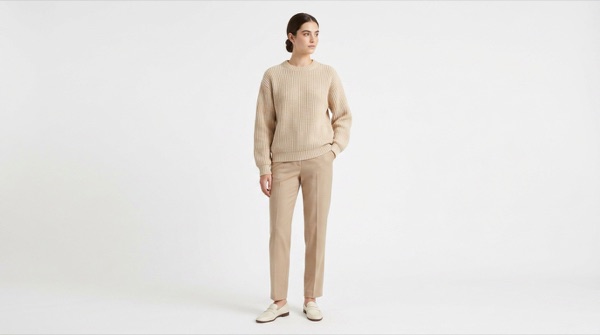
On-model product shots for every SKU — no model, no studio, no photoshoot.



How it works
1 · Upload the garment
Upload a clean product photo of the garment — flat lay, hanger, mannequin, or cutout. The cleaner the isolation, the better the result.
2 · Choose a scene
Pick a scene preset — studio, café, outdoor, street editorial, beach, or minimalist — or describe a custom setting in the Notes field.
3 · Generate four variations
Mintdreamer generates four photorealistic on-model variations in seconds, preserving the garment's exact colors and structure.
4 · Download and ship
Export full-resolution shots for your store, ads, and lookbooks. Re-run with a different scene to expand the same SKU's content library.
What it costs
Nano Banana Pro starts at 16 credits per output at default settings. Check your settings and total in Studio before running.
See the plans →The models behind it
Pick a different one from the composer if you want.
Made for
Shopify apparel stores
Generate on-model shots for every SKU without booking a model or studio. Cut time-to-listing from days to minutes and free up budget for paid acquisition.
Fashion designers and brands
Visualize a new sample on photorealistic models before committing to a full photoshoot, validating fit and styling decisions earlier.
Marketing and lookbook teams
Spin up seasonal lookbook imagery at scale by combining your full product catalog with consistent scene presets and lighting.
DTC brands refreshing the storefront
Refresh static product pages with editorial lifestyle shots instead of catalog cutouts — without re-shooting the entire collection.
Performance marketers
Test ad creative variants quickly: same garment, different model, different setting, ready for paid social experiments in minutes.
Other one-click apps
The same starting point, other jobs.
AI Image to Video — Bring Any Photo to Life →
A person, a product, a place, a pet — upload one still, describe the motion, and watch it move in seconds. No keyframes, no timeline. Just a photo and a prompt.
AI Avatar / PFP →
Upload one selfie and get a unique, stylized profile picture in seconds. Anime, cinematic, fantasy, pixel art — your face, your identity, any style.
YouTube Thumbnail →
Upload a face photo, enter your video title, and get a click-worthy 1280x720 thumbnail. Built for YouTubers who need results fast without a graphic designer.
Outfit Try-On →
Upload a garment photo and a model image to see exactly how the clothing looks when worn. No photoshoot needed — ideal for Shopify stores, fashion brands, and shoppers.