圖片模型 · Black Forest Labs

FLUX.2 [dev]

逼真到難辨真假的照片。

寫實人像、商品與編輯風格圖片,並支援精準的參考圖編輯。

查看所有圖片模型 →免費模型贈送 100 點免費點數 · 進階模型需訂閱方案
Change the color of the gloves to the color of image 2圖片 · FLUX.2 [dev]
FLUX.2 [dev]

附來源連結的範例。挑選一張圖片,再改寫成你的提示詞。

最擅長什麼

最擅長什麼。每項成果,直接呈現。

真實的 FLUX.2 [dev] 成果,附上可試用的提示詞與來源連結。

Change the color of the gloves to the color of image 2

範例 1

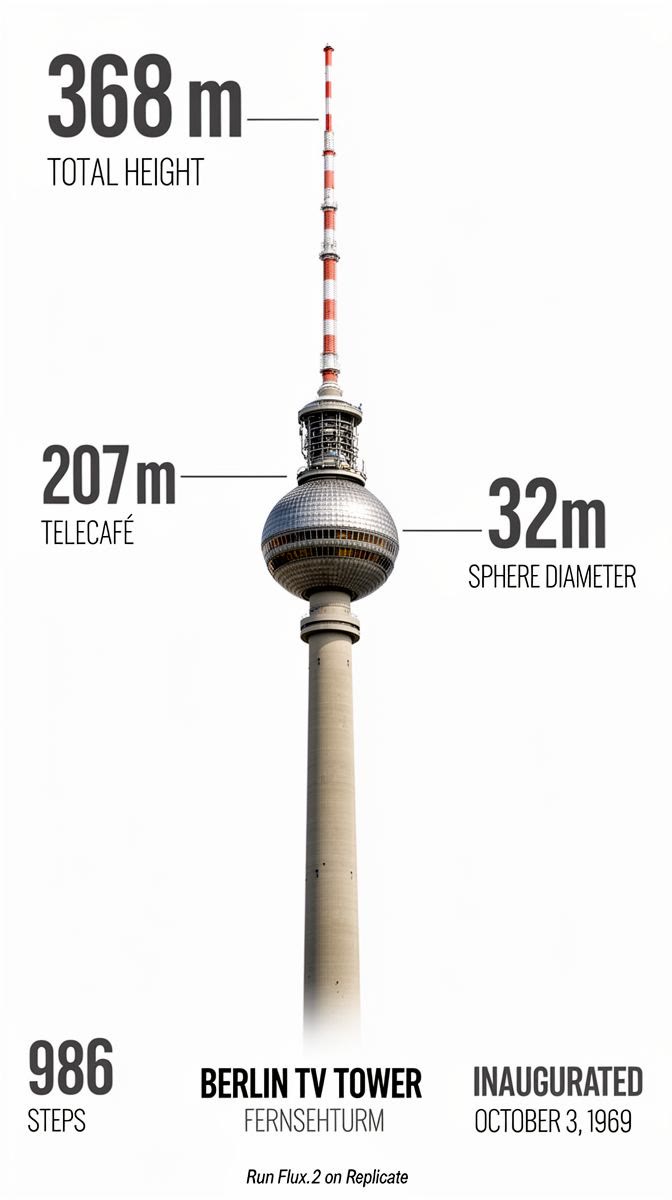
Photorealistic infographic showing the complete Berlin TV Tower (Fernsehturm) from ground base to antenna tip, full vertical view with entire structure visible including concrete shaft, metallic sphere, and antenna spire. Slight upward perspective angle looking up toward the iconic sphere, perfectly centered on clean white background. Left side labels with thin horizontal connector lines: the text '368m' in extra large bold dark grey numerals (#2D3748) positioned at exactly the antenna tip with 'TOTAL HEIGHT' in small caps below. The text '207m' in extra large bold with 'TELECAFÉ' in small caps below, with connector line touching the sphere precisely at the window level. Right side label with horizontal connector line touching the sphere's equator: the text '32m' in extra large bold dark grey numerals with 'SPHERE DIAMETER' in small caps below. Bottom section arranged in three balanced columns: Left - Large text '986' in extra bold dark grey with 'STEPS' in caps below. Center - 'BERLIN TV TOWER' in bold caps with 'FERNSEHTURM' in lighter weight below. Right - 'INAUGURATED' in bold caps with 'OCTOBER 3, 1969' below. At the very bottom center, below the columns, add small italicized text 'Run Flux.2 on Replicate' in medium grey (#A0AEC0). All typography in modern sans-serif font (such as Inter or Helvetica), color #2D3748 unless specified, clean minimal technical diagram style. Horizontal connector lines are thin, precise, and clearly visible, touching the tower structure at exact corresponding measurement points. Professional architectural elevation drawing aesthetic with dynamic low angle perspective creating sense of height and grandeur, poster-ready infographic design with perfect visual hierarchy.

範例 2

範例來源: Replicate · black-forest-labsReplicate · black-forest-labs

規格

技術細節

輸出
高解析度,預設 4:3+自訂長寬比
輸入
提示詞(必填)· 圖片
供應商
Black Forest Labs
這裡的價格
每張圖片 2 點數 (≈ $0.02)
系列
flux-2
生成時間
均衡 — 數十秒
提示詞語言
多語言
商業使用
允許 — 成果歸你所有

提示詞怎麼寫

從這段提示詞開始。改成你的風格。

點選範例,就會帶入上方輸入框。

優勢與限制

擅長什麼,又不擅長什麼。

擅長

  • 多語言
  • 參考圖編輯
  • 開放權重
  • 高性價比

注意事項

  • FLUX.2 採用全新的多語言文字編碼器,不受限於只能使用英文。

版本與系列

認識這個系列

本頁可用的模型,以及各自適合的用途。

現成應用

不用想提示詞。直接選工作。

挑選工作項目,模型與設定都已預先選好。

常見問題

直接解答

FLUX.2 [dev] 費用是多少?+
每張圖片 2 點數 (≈ $0.02)。一份 Mintdreamer 訂閱即可使用 FLUX.2 [dev] 與所有其他模型;新手贈 100 免費點數,免綁卡。
FLUX.2 [dev] 可以免費試用嗎?+
可以,新帳號可獲得 100 免費點數,可用於 FLUX.2 [dev]。帶著你的提示詞與模型前往 Studio,即可開始生成。免綁卡。
生成失敗會扣點數嗎?+
不會。若生成失敗、遭拒或結果無法使用,Mintdreamer 會自動退還點數;你只需為保留的成果付費。
需要 API 金鑰或另外註冊嗎?+
不需要。FLUX.2 [dev] 可直接在 Mintdreamer 的 Studio 使用:一次登入、一個方案。無須各家供應商帳號,就能在同一工作階段切換所有模型。
我可以將圖片用於商業用途嗎?+
可以。成果可供商業使用,但仍須遵守我們的條款。

相關模型

你可能也會想看

你的想法。從這裡開始。

輸入框會記住你在上方選擇的提示詞。